Factory manual / Early Access • V16.4 rules
Find all 24 needles and trace a missing find through the factory
Early Access has 24 needles; this is a search-and-recovery process, not a fixed-coordinate map. Use the Metal Detector while digging exposed hay, and put scanners after the final packaging stage so hidden needles cannot leave inside sold products. Empty every scanner drawer, inspect machine contents and Depot stock, and check the cabinet drawer when a found needle seems absent. A needle sold inside a product returns to the pile.
Updated 2026-11-17 · Early Access • V16.4 rules
On this page
Follow the route
Use the detector as you expose the pile
In V16.4 the Metal Detector mission appears directly after the Spade mission, at a reduced price. Complete that mission to obtain the detector. Search the exposed surface, listen for the detector response, remove hay in the indicated area and sweep again as the surface changes. V14.1 lets the detector hear through the side of a tall pile; the hunt is not restricted to a top-down approach. Avoid treating a recorded player’s location as a guaranteed spawn coordinate.
Protect every packaged route
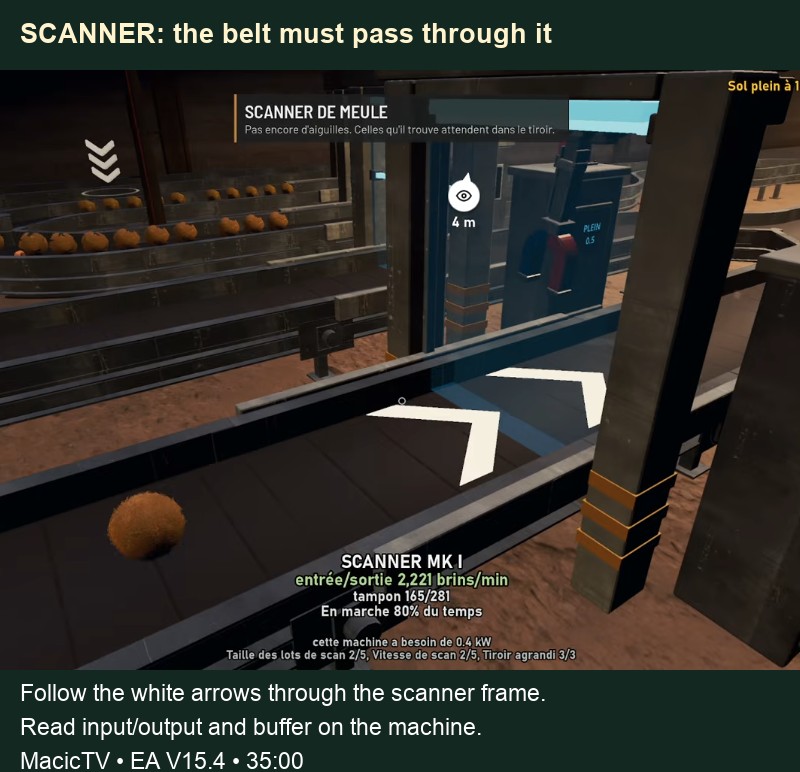
A baler, wrapper, press or Silo can put a needle inside a load. Scan after the last such step and before any route to the stand, Depot or delivery. Follow a load through the frame on every branch. An early scrap-removal scanner does not replace the final packaging check.
 Open full-size image ↗
MacicTV EA V15.4 at 35:00. A load must cross the scanner frame; standing nearby does not count as coverage. Collect from the scanner drawer
Aim at each Scanner and press E to open its drawer. The drawer holds its detected needles; the scrap cannon launches metal separately. Check all scanners, including the source-side metal-removal ones. Do not assume the only useful drawer is the final gate on the main selling route.
Put a found needle into the cabinet
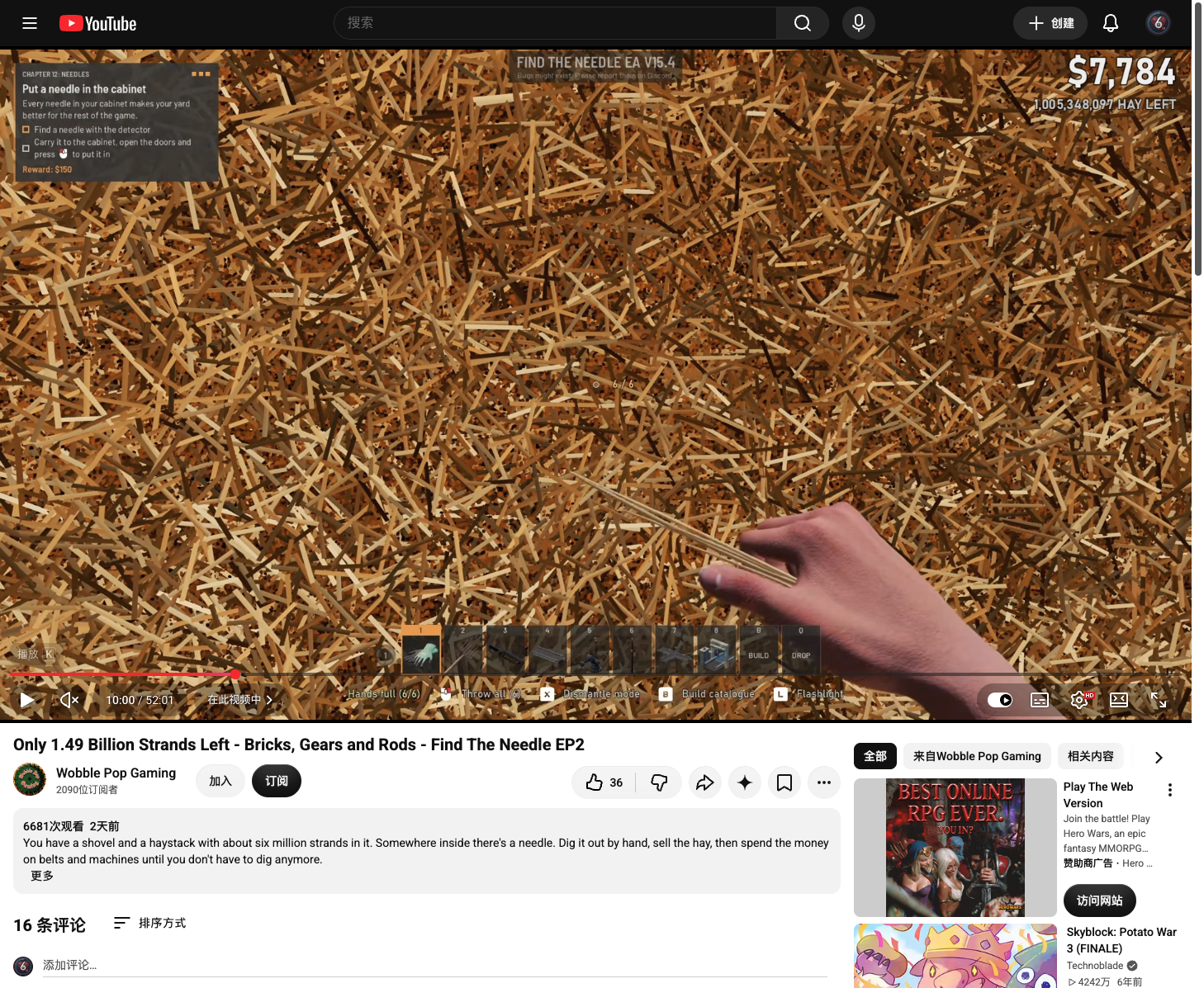
Carry the needle you have picked up to the Needle Cabinet. Open its doors, then use the on-screen Put it in interaction while holding the needle. Check that the cabinet count advances. A new type produces a NEW NEEDLE card showing its name and factory bonus; the recorded first find also changes the count to 1/24 and completes the cabinet tutorial. Read the actual bonus shown for your find rather than expecting the illustrated Bone bonus on every needle.
 Open full-size image ↗
Wobble Pop Gaming, EA V15.4 at 10:00. Follow the Put it in prompt shown by your game.  Open full-size image ↗
Z1 Gaming, EA V15.4, first-find sequence at 1:04:36–1:05:18. This Bone find shows +40% capacity for Silos, Scanners and hay machines; read the bonus on your own find. Open full-size image ↗The cabinet footer confirms 1/24 in the same first-find sequence. Trace a missing needle before digging again
Start with the machines and storage that the last needle-bearing load could have reached. Read machine content counts, then inspect every relevant Depot’s own stock list and the belts connecting them. Check any arm that feeds a generator directly. This side route can avoid the finished-product scanner. Add an upstream scanner to that branch before resuming its feed; use the route check to prevent another needle bypass.
Where to look when a find seems to vanish Possible location What to inspect Scanner drawer Open every gate, including upstream scanners. Press, wrapper or Silo Read contents and follow the load’s output. Depot or its outfeed Open that Depot’s inventory and trace stored goods. Generator supplied by an arm Check that side route before assuming a sale. Cabinet drawer A full cabinet stores spare needles there. Pile again A sold needle-bearing product returns its needle here. Check the cabinet and sockets
A full needle cabinet sends spare finds to a drawer rather than dropping them. In V16.4 you can click the needle case panel to lift it and take needles out, and a thrown needle can enter a Needle Socket. Account for needles you moved into sockets before calling a find lost.
Apply the specific old-save fixes
Update an older save before repeating the entire hunt. V15.4 fixes a Hay Silo losing a needle when trimming a load. V16.4 fixes the excavator leaving needles standing in its hole and repairs saves where ordering a new pile before pressing the red button locked needles in the case. The case repair happens on load.
Separate needle progress from order progress
Finding all 24 needles leads to the ending, and needles provide factory-wide bonuses. Since V15.4, no pile size requires needle finds to unlock bigger orders, so you can keep making order progress while searching. HAY 1 / BUBBA 0 is the falling scoreboard, not a needle counter. Follow the ending prompts when the set is complete; this guide keeps the ending itself unspoiled.
Completion check
Check the result
All 24 needles are accounted for by the game’s needle collection, and the ending becomes available. A recovered missing find has an identified drawer, stock route, socket or return-to-pile explanation.
If it still fails
If a sold load carried the needle, repair the scanner bypass and search the pile again. If you are on an old save with a case lock, update and reload first. If goods are parked in machines or a Depot, trace and scan that route before assuming a new spawn or a fixed hidden location.
Continue from here
Sources & version
Written for Early Access V16.4. Earlier gameplay images are labeled where used; diagrams explain connections, not exact building dimensions or measured throughput.
- Official Early Access changelog: 24 needles, bonuses and generator route
- Official V14.1: detector side hearing and cabinet drawer
- Official V15.4: Silo fix and removed order needle gates
- Official V16.4: case lock, socket and excavator fixes
- GG Wiki: scanners and needle recovery
- Wobble Pop Gaming EP2: cabinet task card at 10:00
- Z1 Gaming: first needle registered in cabinet, 1:04:36–1:05:18