Factory manual / Early Access • V16.4 rules
Restore power and keep the essential machines running
Open a generator or power pole and read its POWER tab, then use SHOW POWER LINE to identify the actual circuit. If the circuit is off or disconnected, restore that connection; if demand is above supply, refuel or upgrade generation and lower optional machine speeds. Set the fuel chain, water pumps and the current order line to FIRST, and nonessential loads to LAST. E on a pole toggles the whole network, so use a manual cable for a single machine.
Updated 2026-11-16 · Early Access • V16.4 rules
On this page
Follow the route
Find the affected circuit
At the stopped machine, read whether it is running and its power draw. Open POWER on its nearby generator or pole and turn on SHOW POWER LINE. The highlighted, labelled machines tell you which loads share the circuit; a nearby pole is not proof the machine belongs to it. Use the status explanation to distinguish an unconnected line from an overloaded one.
 Open full-size image ↗
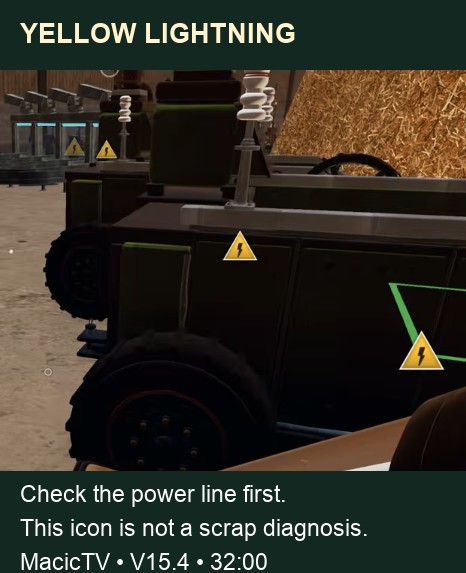
Yellow lightning is a reason to inspect power. It does not prove that metal is blocking the machine. Restore a connection or switch
If the line was switched off, turn it back on. If one machine is absent from the highlighted circuit, run a cable by hand from the pole to that machine. Check for an obstructed or cut cable, especially after placing new machinery or expanding the shed. V16.4 shows a cable in red before a placement cuts it; wall expansion can remove cables that become too long.
Compare live generation with demand
Read what the circuit makes and wants rather than adding up old card values. Check every generator’s fuel supply; a running belt elsewhere does not prove this generator has fuel. In V16.4 the card and generator panel include tuning and needle boosts, and the panel lists those boosts. Fix the stated shortage before changing the belt layout.
Reduce demand or add generation
For a small early deficit, reduce the clock of optional machines or buy a Stronger Generator upgrade. The V15.4 prices are $30 for the electricity connection, $60 for the first Hay Generator and $80 for the second; the first generator upgrade costs $15. Read the current upgrade card before buying, since the output depends on the level and boosts. Do not raise clocks above 100% while trying to cure a shortage.
Give the essential chain a consistent priority
Open each machine’s PRIORITY tab. The game sheds LAST loads first when power is short. Keep machines that depend on one another at a compatible priority so a fuel or water support machine is not turned off while its customer stays enabled.
A practical starting priority plan Machine role Setting Why Generator feed and water pumps FIRST Keep the supply chain alive. Machines completing the active order FIRST Protect the current delivery. Other selling lines NORMAL Run while capacity remains. Scanners on a running product line NORMAL or FIRST Keep the needle check with its production line. Experimental or optional equipment LAST Shed this demand first. Increase clock only after the line is stable
The normal clock range is 1%–100%. A Needle Socket containing a needle permits a machine to go above 100%; that is a capacity decision for a supplied circuit, not a repair for low power. Re-read the live power panel after tuning or adding a socket. Test the full production chain with inputs arriving, since an idle machine can hide demand.
Check the other fault layers if power is healthy
If the machine receives enough power but goods do not move, inspect the input arrows, scrap status and full outfeed next. A dry water consumer is a separate network problem. Use the same route diagram to keep these diagnoses apart.
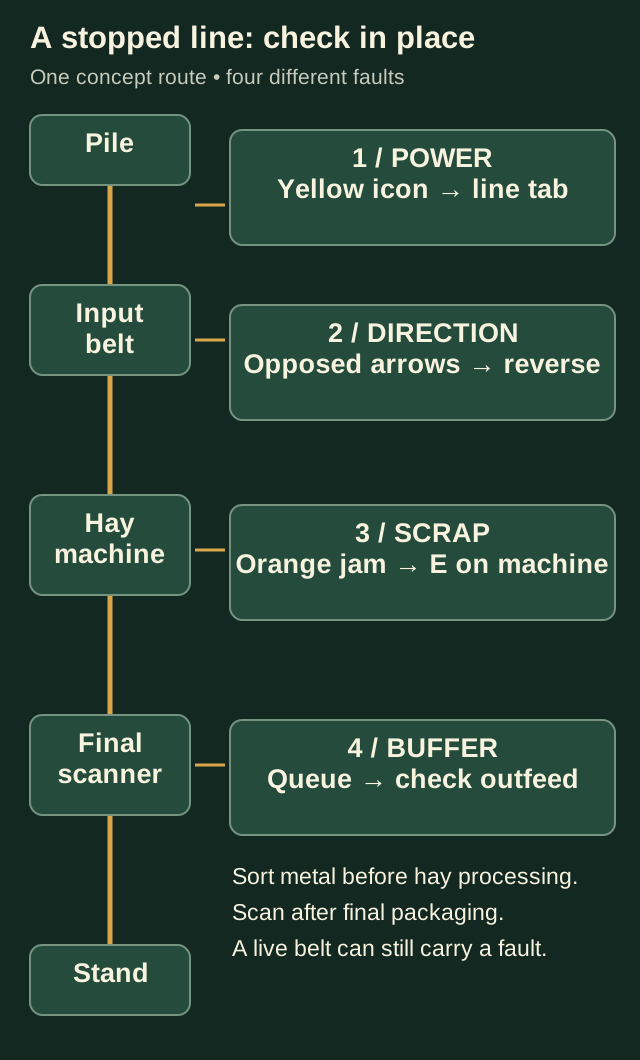
Power is one layer. Confirm it, then follow the first stopped part of the same line.
Completion check
Check the result
The intended machines are highlighted on the correct circuit, supply covers demand under load, and fuel and water support continue running while products reach the next machine.
If it still fails
If the yard goes dark after pressing E at a pole, toggle that network back on. If only the LAST machines stop, solve the circuit’s shortage before changing priorities. If a generator repeatedly runs out of feed, repair its fuel route and keep the fuel equipment on FIRST.
Continue from here
Sources & version
Written for Early Access V16.4. Earlier gameplay images are labeled where used; diagrams explain connections, not exact building dimensions or measured throughput.