Factory manual / Early Access • V16.4 rules
Find a target card and buy the upgrade that unblocks your line
Open a machine’s UPGRADE tab to find its tech cards, or open the Tech Tree and search for the target. Select the card, read its prerequisite, level effects and price, then use PIN AS GOAL—or the tree’s G goal control—to keep the next step visible. When it is ready and affordable, use the BUY button for the intended level. Since V15.4, an unlocked card’s upgrade levels no longer wait for another order; most cost money, while shed and Skyline Crane claw/winch upgrades still require parts.
Updated 2026-11-17 · Early Access • V16.4 rules
On this page
Follow the route
Choose the card that solves the current problem
For an order you cannot make, identify the required machine first. For a working line that is too slow, identify the machine actually holding up the flow before buying speed. Open that machine’s UPGRADE tab to see its cards and jump to them. The Tech Tree also has a search field, category list and Show everything control for cards farther along the path.
Read the prerequisite and pin the next step
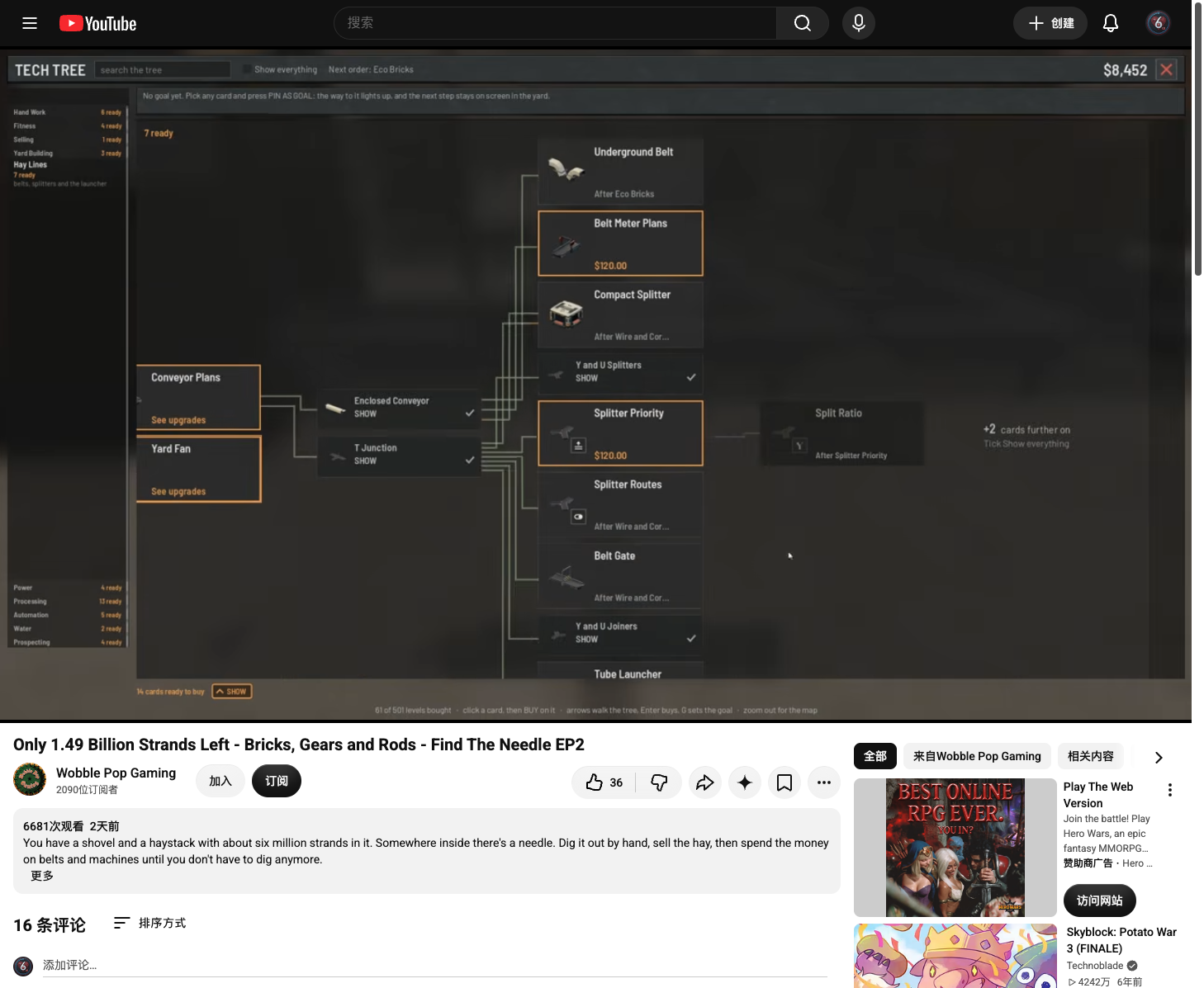
Select the target card. Follow its connecting path and read any named prerequisite or order requirement. The tree’s own instructions say to pick a card and press PIN AS GOAL; its footer also lists G as the goal control. A pinned goal lights its path and keeps the next step on screen in the yard. Pin the useful target rather than buying every highlighted card.
 Open full-size image ↗
Pick the target card, then use PIN AS GOAL. EA V15.4 instruction strip; the full-size image shows the surrounding tree. Compare the current and next level before buying
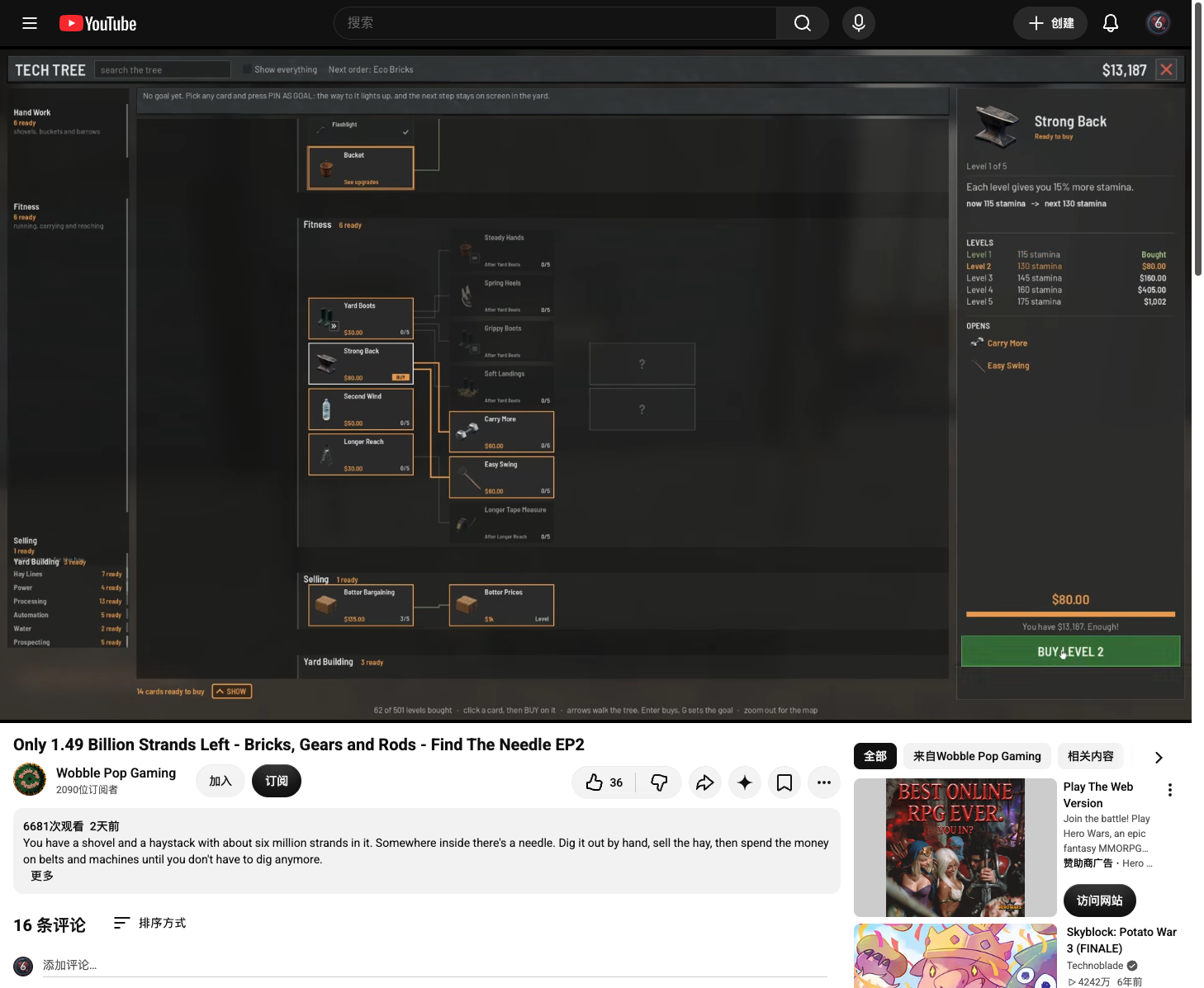
The selected card’s side panel lists levels, effects and prices. Read the change you will actually receive and the money remaining. In the recorded Strong Back example, the panel shows the current stamina and next stamina, marks Level 1 Bought and offers BUY LEVEL 2 when the money bar says Enough. Treat that as the purchase pattern, not a recommended Strong Back level or universal price.
 Open full-size image ↗
Compare the current and next effect, then the level list. Strong Back in EA V15.4 is an example, not a recommended price or level. Open full-size image ↗Enough confirms this save can afford BUY LEVEL 2. Read your selected card’s own price. EA V15.4 at 41:40. Separate a card upgrade from placing a building
An unlocked card’s levels no longer have an order gate under V15.4. Most upgrade levels cost money; Extend the Shed and Skyline Crane claw/winch upgrades still have material requirements. Placing a building has its own bill and preview. Read that bill separately rather than assuming that a money-only card makes every copy of its machine free of parts.
Read the bill for the action you are taking Action What to check Buy an upgrade level Current and next effect, price and any explicit parts requirement. Unlock a machine card The prerequisite path and the order that opens that card. Place a building The hologram’s money and parts bill, plus named obstructions. A Depot is short message The named item and live count for that particular building preview. Build or tune the machine, then verify the result
After purchase, check that the card’s bought level or next-level offer changed. Return to the machine and confirm the expected option or capacity. If the goal was a new machine, equip and place it from Build; if it was more throughput, watch the formerly stalled section run. A faster machine still needs the correct inputs, power, water where applicable and room at its outfeed.
Spend on the next blocker before expensive levels
The absence of an order gate makes high upgrades available earlier; it does not make them the best next purchase. Add the machine needed by the current order, enough generation for it and a scanner that can keep up before buying distant speed levels. Use the current card’s effects and prices to decide whether another level solves the bottleneck you can see.
Completion check
Check the result
The intended card or level is bought, the machine shows its expected change, and the blocked production step works with its actual inputs and utilities.
If it still fails
If BUY is unavailable, read the selected card’s prerequisite, money bar and any required parts. If the card is bought but a building preview stays red, read that preview’s own missing item or obstruction. If the upgrade did not clear the stall, trace input, power and outfeed before buying another level.
Continue from here
Sources & version
Written for Early Access V16.4. Earlier gameplay images are labeled where used; diagrams explain connections, not exact building dimensions or measured throughput.