Factory manual / Early Access • V16.4 rules
Sell goods, read the price board and respond when prices fall
Sell loose hay or finished goods at the Selling Stand’s HAY IN intake. A belt can feed it continuously. At the chalkboard beside the stand, press E to open Today’s Prices, select the product and compare its current price, best price, buyer demand per minute and your selling rate. Each product has its own buyers: selling above their full-price limit lowers that product’s price; selling less lets it climb back. Reduce or redirect that output, then check the board again. Orders pay as the truck loads, including their 25% bonus, so delivery can advance progression while earning money.
Updated 2026-11-17 · Early Access • V16.4 rules
On this page
Follow the route
Feed the stand and check that a sale happens
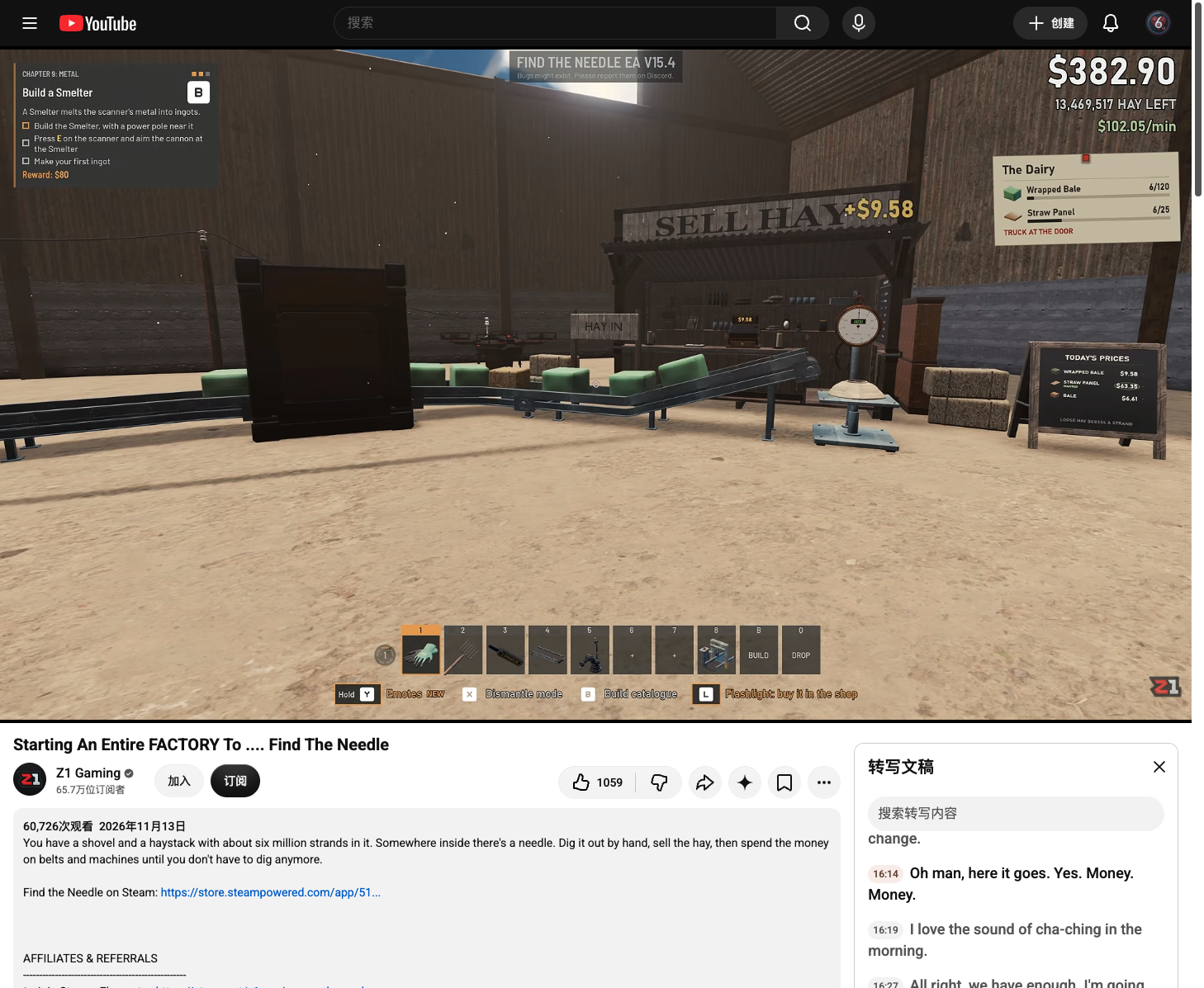
Find the stand marked SELL HAY and its HAY IN intake. Bring loose hay there, or run the finished-product belt into the intake for continuous sales. Watch a load reach the stand, look for the floating +$ payment and check your money. Keep a scanner after the final packaging machine and before the selling branch so a hidden needle does not leave inside a product.
 Open full-size image ↗
Z1 Gaming, EA V15.4 at 16:14. Feed the HAY IN intake. The full-size frame also shows the payment above the stand. Open the price board beside the stand
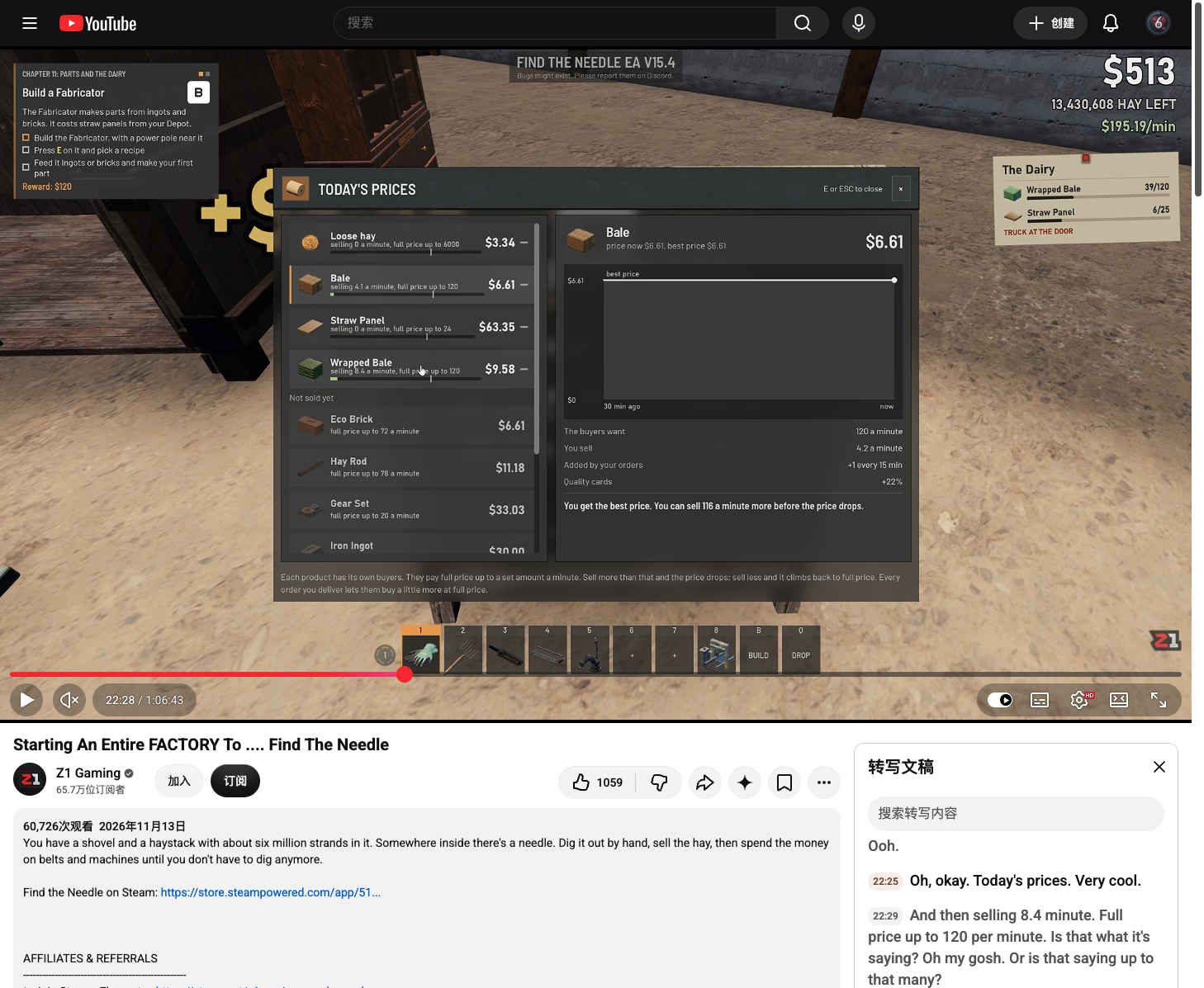
Walk to the chalkboard marked TODAY’S PRICES beside the stand and press E. Select the product you are selling in the left list. Its right panel shows price now, best price and the price history. Goods not sold yet can also appear on the board once you can produce them.
 Open full-size image ↗
Selected product: price now and best price. Z1 Gaming, EA V15.4 at 22:28; values belong to that save. Open full-size for the list, chart and buyer panel. Compare the buyer limit with your selling rate
Read The buyers want and You sell for the selected product. The list also states the full-price amount per minute. The panel separates increases added by your orders and quality-card bonuses. A high belt throughput does not mean every item earns the best price: if you supply more than that product’s buyers take at full price, its price drops.
Open full-size image ↗Compare the live figures to the right of these labels. This is a V15.4 example board; its buyer demand and selling rate belong to that save. What the price board tells you Readout Use it to decide Price now / best price Whether this product is currently selling below its best price. The buyers want The current full-price demand for that product per minute. You sell How fast you are supplying that product. Added by your orders The extra buyer demand gained from order progress. Price history Whether the price is falling or recovering after you change the flow. Redirect some output when you are overselling
If the product’s current price is below its best price and you are selling above the buyer limit, send less of that product to the stand. Adjust an existing splitter, keep useful material in a Depot or feed another production step. Spreading sales across different products uses different buyers. The board explicitly says that selling less lets the price climb back to full price; check its live result after changing the route. V15.4 also sets the stand’s minimum payment at 70% of the original price.
Keep orders and building stock in the allocation
Read the current order before sending all finished goods to the stand. Since V15.4, the truck pays as you load and includes the 25% bonus with each delivery, so you can earn while advancing the order. Send the exact goods still wanted by the lorry; retain parts you need for your next building. Use a T Junction or your current splitter to divide the line rather than rebuilding the whole factory just to switch destinations.
Verify both money and the destination counter
After changing the route, follow a few loads. Goods sent to the stand should produce payments and appear in that product’s selling rate; goods sent to the truck should raise the matching order count. In V16.4, lorry payments also count toward $/min and best minute, so that yard readout can include order income. Reopen Today’s Prices to see whether your selected product’s price and rate now fit your plan.
Completion check
Check the result
The intended goods reach the stand and pay, the board shows their current price and selling rate, and your remaining output reaches the order or stored-material destination you chose.
If it still fails
If money does not rise, follow the belt to HAY IN and check that the load reaches the intake. If the price is low, compare the product’s own selling rate and buyer limit before adding more speed. If an order count stays unchanged, verify the exact product and the route to the current lorry.
Continue from here
Sources & version
Written for Early Access V16.4. Earlier gameplay images are labeled where used; diagrams explain connections, not exact building dimensions or measured throughput.